
Best AI for Coding in 2026
Introduction
The best AI for coding in 2026 can do much more than complete a few lines of code. Today’s leading AI coding tools can inspect repositories, explain unfamiliar architecture, edit multiple files, run terminal commands, create tests and prepare code for human review.
For professional developers managing repository-level projects, OpenAI Codex is our strongest overall recommendation. It offers a broad agentic development experience across ChatGPT, desktop applications, supported editors, the terminal and cloud environments.
However, one tool will not suit every developer.
Claude Code is particularly effective for terminal-based development and detailed codebase exploration. GitHub Copilot is a natural choice for teams already managing their software-development lifecycle through GitHub. Meanwhile, Cursor offers an AI-first development workspace, and Replit Agent makes application building more accessible to beginners.
Google has also changed its coding-product strategy. Its consumer Gemini Code Assist services were discontinued in June 2026, with affected users directed toward Google Antigravity and Antigravity CLI. Gemini Code Assist Standard and Enterprise remain relevant for eligible business users.
Therefore, the best choice depends on your experience, programming language, repository size, security requirements and preferred development environment.

Best AI for Coding: Quick Answer
Our recommended tools for different users are:
- Best overall: OpenAI Codex
- Best for terminal-based development: Claude Code
- Best for GitHub teams: GitHub Copilot
- Best AI-first coding workspace: Cursor
- Best for Google development workflows: Google Antigravity
- Best for beginners and prototypes: Replit Agent
OpenAI Codex is the strongest all-round option for developers who need an agent to inspect a project, make coordinated changes, run development tasks and prepare work for review.
Nevertheless, developers should compare at least two platforms using the same real project before choosing a long-term tool.
What Is AI for Coding?
AI for coding refers to artificial-intelligence models and software tools that help people understand, create, test, debug and maintain computer code.
Early coding assistants mainly predicted the next word, line or function. Modern systems can perform much broader tasks, including:
- Explaining an unfamiliar codebase
- Generating functions and application components
- Editing several connected files
- Finding possible causes of bugs
- Writing unit and integration tests
- Refactoring outdated code
- Running terminal commands
- Reviewing pull requests
- Preparing technical documentation
- Migrating projects between frameworks
- Building applications from natural-language instructions
Although the terms are often used interchangeably, an AI model, assistant and agent are not exactly the same.
AI coding model
An AI coding model is the underlying language model that interprets instructions, reasons about software and generates code.
Examples include coding-focused models used by OpenAI, Anthropic, Google and other AI companies.
AI coding assistant
An AI coding assistant is the product through which a developer interacts with a model.
It may provide code completion, chat, debugging support, documentation and contextual suggestions inside an integrated development environment, or IDE.
AI coding agent
An AI coding agent can take actions instead of only suggesting them.
For example, it may inspect files, choose an implementation plan, edit a project, execute approved commands, run tests and evaluate the result.
This distinction matters because the best AI model for coding is not automatically the best coding product. A strong model inside a weak workflow may be less useful than a well-integrated system with reliable repository context, testing capabilities and permission controls.
Readers interested in the broader shift from AI suggestions to autonomous action can also explore TechWaveDigest’s guide to AI-powered execution in 2026.
How Does an AI Coding Assistant Work?
Most AI coding tools combine a language model, project context, development tools and a repeated decision-making process.
The language model interprets the request
First, the model reads the developer’s instruction.
For example, the developer might ask:
Add email verification to the user-registration process, follow the project’s current authentication patterns and create tests for expired verification links.
The model identifies the requested outcome, relevant technical concepts and possible implementation steps.
The assistant gathers project context
Next, the assistant may examine:
- The currently open file
- Related project files
- Repository instructions
- Package and dependency files
- Error messages
- Test configurations
- Version-control history
- Existing coding patterns
Context is essential. Without it, an AI tool may generate code that works independently but conflicts with the project’s architecture.
The agent creates a plan
For a complex task, a coding agent may identify the files it needs to inspect and prepare an implementation plan.
A good plan should explain:
- What the agent believes the problem is
- Which files are affected
- What changes it proposes
- How it will test the result
- What risks remain
Developers should review this plan before approving major changes.
The agent uses development tools
Depending on its permissions, the agent may be able to:
- Search the repository
- Read and edit files
- Run a test suite
- Execute shell commands
- Inspect logs
- Create branches
- Review diffs
- Open pull requests
- Connect to external services
For example, GitHub’s Copilot cloud agent can research a repository, prepare an implementation plan and make changes on a branch for review.
The agent verifies its work
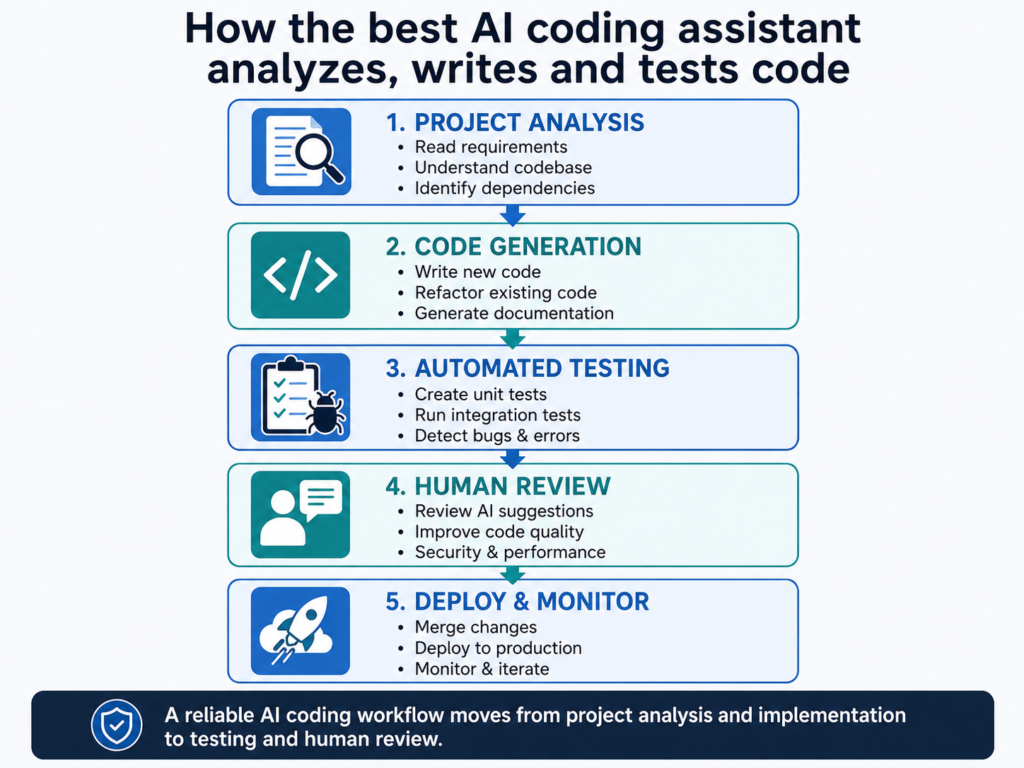
A reliable coding workflow should not end when code has been generated.
Instead, the agent should:
- Run relevant tests.
- Inspect failures.
- Correct the implementation.
- Run formatting and static-analysis tools.
- Review the final changes.
- Report unresolved risks.
The developer must then inspect the changes and decide whether they are safe to accept.
Why Finding the Best AI for Coding Matters
Selecting the wrong tool can create more work instead of reducing it.
A beginner may need a simple interface, clear explanations and an integrated deployment environment. On the other hand, a senior engineer working with a large production repository may need terminal access, reliable codebase navigation, custom instructions and strict permission controls.
A development team may also care about:
- Compatibility with its current IDE
- GitHub or GitLab integration
- Repository access controls
- Enterprise data protection
- Audit logs
- Model availability
- Custom coding standards
- Deployment options
- Support for multiple agents
- Long-term product stability
Therefore, the strongest tool is not necessarily the one that produces the longest code sample.
It is the tool that improves the team’s development process while keeping its output understandable, testable and reviewable.
Companies evaluating AI across several departments may also benefit from TechWaveDigest’s guide to the best AI tools for small businesses.
Main Benefits of AI Coding Tools
Faster codebase exploration
Understanding an unfamiliar repository can take longer than making the eventual change.
An AI coding assistant can summarize directories, trace how data travels through an application and explain how different files interact.
This is useful when:
- Onboarding a new developer
- Maintaining inherited software
- Returning to an old project
- Reviewing an unfamiliar open-source repository
- Investigating a production problem
Claude Code, for instance, is designed to understand a codebase, make changes and execute development tasks through a terminal-based workflow.
Faster repetitive implementation
Developers frequently create predictable structures such as:
- API endpoints
- Data models
- Validation functions
- Test cases
- Configuration files
- Database migrations
- User-interface components
- Technical documentation
An AI code generator can prepare the first implementation. As a result, the developer can spend more time reviewing architecture, business requirements and difficult edge cases.
- The complete error message
- Steps needed to reproduce the problem
- The expected result
- The actual result
- Relevant files
- The command used to run the project
This gives the assistant a clear and measurable problem.
Improved test creation
AI coding tools can generate tests for:
- Expected behaviour
- Invalid input
- Boundary conditions
- Authentication failures
- Missing data
- Error-handling paths
Furthermore, an agent can run those tests and revise the implementation when failures occur.
Still, AI-generated tests need human review. A test can pass while validating the wrong behaviour.
Easier documentation
Documentation is often delayed during fast development cycles.
AI can help prepare:
- Function descriptions
- API documentation
- Setup instructions
- Change summaries
- Pull-request descriptions
- Architecture notes
- Release notes
Nevertheless, the developer must verify that the final documentation matches the final code.
Greater accessibility for beginners
Beginners no longer need to memorize every command before creating a small application.
They can describe an idea, ask how the generated code works and request step-by-step explanations.
However, beginners should use AI as a teacher rather than only as an answer generator. Understanding the code remains essential for future maintenance and debugging.
Support across the development lifecycle
Modern coding tools can contribute to planning, implementation, testing, review, migration and maintenance.
This shift is part of a wider movement toward intelligent automation. TechWaveDigest’s guide to workflow automation in 2026 explains how organizations are applying similar principles beyond software development.
Major Risks and Limitations
AI coding tools can be powerful, but they are not automatic sources of correct software.
Incorrect or fabricated code
An AI model may invent:
- A library method
- An API endpoint
- A configuration option
- A dependency
- A framework feature
- An unsupported command
The response may look technically convincing while failing during execution.
Therefore, developers should require tests, build results and verifiable evidence rather than trusting a polished explanation.
Security vulnerabilities
Generated code may contain:
- Weak authentication logic
- Missing authorization checks
- Injection vulnerabilities
- Unsafe data handling
- Exposed credentials
- Insecure dependencies
- Overly broad permissions
Security should not be reduced to asking the same AI that created the code whether the code is secure.
Instead, use established security scanners, dependency checks, peer review and independent testing. TechWaveDigest’s guide to AI cybersecurity tools provides additional security-focused resources.
Loss of project context
Long coding sessions can accumulate unrelated files, old instructions, failed approaches and large amounts of terminal output.
As a result, the model may give more weight to outdated information or lose track of the original requirement.
Developers should:
- Keep individual tasks focused
- Start a new session for unrelated work
- Remove outdated instructions
- Summarize important decisions
- Store permanent project rules in repository files
Privacy and confidential code
Before connecting an AI assistant to a proprietary repository, an organization should review:
- Whether prompts are retained
- Whether data is used for model training
- Which files the assistant can access
- Whether sensitive directories can be excluded
- How commands are logged
- Which enterprise controls are available
- How credentials and secrets are protected
Policies may differ between free, individual, business and enterprise plans. Consequently, teams should not assume that every version of a product has identical privacy protections.
Licensing concerns
AI-generated code may resemble publicly available software or introduce dependencies with licensing requirements.
Developers remain responsible for:
- Reviewing new packages
- Checking open-source licences
- Preserving required notices
- Avoiding incompatible dependencies
- Following company policies
Overreliance on generated code
Developers who accept code without understanding it may struggle to secure, maintain or repair the project later.
AI should accelerate professional judgment, not replace it.
Rapid product changes
AI coding platforms change quickly.
Features may move between plans, models may be replaced and entire services may be discontinued. For example, Google stopped serving Gemini Code Assist consumer accounts through its former IDE extensions and Gemini CLI on June 18, 2026.
Therefore, users should confirm current availability before purchasing a subscription or standardizing a company workflow.
Best AI for Coding in 2026: Top Tools Compared
1. OpenAI Codex — Best Overall
OpenAI Codex is our strongest overall choice for developers who want an agent capable of completing meaningful repository-level work.
Codex can assist with:
- Feature implementation
- Bug fixing
- Codebase questions
- Refactoring
- Migrations
- Code review
- Pull-request preparation
- Terminal-based development
- Parallel agent workflows
OpenAI provides Codex across ChatGPT, desktop applications, supported editors, terminal workflows and cloud environments.
Its desktop experience can also manage multiple coding agents in parallel. Developers can inspect changes, comment on diffs and continue editing manually.
Best for
- Professional software engineers
- Repository-level development
- Multi-file changes
- Refactoring and migrations
- Teams managing several coding tasks
- Developers already using ChatGPT
Main limitation
Codex can perform substantial actions. Therefore, developers need strong permission controls, focused instructions and careful code review.
Its ability to complete a task does not prove that it understood every unstated business requirement.
2. Claude Code — Best for Terminal-Based Development
Claude Code is an agentic coding tool designed for terminal-based development, codebase exploration and multi-step software tasks.
It can help developers:
- Understand unfamiliar projects
- Plan complex implementations
- Edit multiple files
- Run commands
- Debug failures
- Generate tests
- Prepare commits
- Review code changes
A strong Claude Code workflow separates exploration from implementation.
For example:
- Ask Claude to inspect the problem.
- Request an implementation plan.
- Review the plan.
- Allow the changes.
- Run the tests.
- Examine the final diff.
Best for
- Terminal-first developers
- Complex debugging
- Large codebase exploration
- Detailed implementation planning
- Multi-file changes
- Interactive developer control
Main limitation
Long sessions can become cluttered with files and command output.
Therefore, developers should manage context carefully and use separate sessions for unrelated tasks.
3. GitHub Copilot — Best for GitHub Teams
GitHub Copilot is one of the most complete options for organizations already using GitHub and supported IDEs.
Its features include:
- Inline code suggestions
- IDE chat
- Agent mode
- Command-line support
- Cloud-based coding tasks
- Code review
- Pull-request workflows
GitHub’s cloud agent can research a repository, create a plan and make code changes on a branch. The developer can then inspect the changes and decide whether they should become a pull request.
Best for
- Organizations using GitHub
- Pull-request-driven teams
- Developers who want inline suggestions and agents
- Teams requiring repository-based workflows
- Businesses managing coding access centrally
Main limitation
The experience can vary depending on the IDE, selected model, plan and development mode.
Teams should define when autonomous agents may be used and what review is required before merging changes.
4. Cursor — Best AI-First Coding Workspace
Cursor is designed around AI-assisted and agentic software development.
Its agents can plan, write and review code using repository context. Cursor also supports development across desktop, command-line, web and mobile experiences.
Cursor is particularly attractive to developers who want AI deeply integrated into their development workspace rather than using a separate chatbot.
Best for
- Developers seeking an AI-native workspace
- Rapid feature development
- Repository-wide edits
- Local and cloud agent workflows
- Developers managing several coding tasks
Main limitation
Moving to a new development environment can disrupt existing extensions, keyboard shortcuts and team conventions.
Organizations should test Cursor on a limited project before adopting it across the entire company.
5. Google Antigravity — Best for Google Development Workflows
Google Antigravity is Google’s agentic development platform for launching, monitoring and orchestrating coding agents.
It includes development-focused capabilities such as:
- Agent management
- Project planning
- File editing
- Command execution
- Browser interaction
- Google developer-tool integrations
- Terminal access through Antigravity CLI
Google describes Antigravity as a central command platform for AI agents and provides desktop versions for major operating systems.
Antigravity CLI can read a codebase, run commands, edit files and connect to external tools through the Model Context Protocol, or MCP.
Best for
- Developers using Google Cloud
- Teams building with Gemini models
- Agentic application development
- Google developer-tool integrations
- Developers seeking desktop and terminal workflows
Main limitation
Google’s coding-product transition may confuse users who previously relied on Gemini Code Assist for individuals.
Gemini Code Assist Standard and Enterprise users should verify their current access, while former consumer users should review Antigravity migration guidance.
6. Replit Agent — Best for Beginners and Prototypes
Replit Agent allows users to describe an application or website using natural language and build it within Replit’s integrated environment.
Replit combines:
- Natural-language application building
- Code generation
- Editing
- Previewing
- Testing
- Deployment
- Team collaboration
Replit Agent 4 also supports parallel tasks, collaborative workflows and visual design tools.
Best for
- Beginners
- Founders validating ideas
- Small internal tools
- Web-application prototypes
- Non-technical product creators
- Teams that want building and deployment together
Main limitation
The convenience of an integrated platform may provide less control than a manually configured production environment.
Complex applications still require knowledge of architecture, authentication, databases, security and performance.
AI Coding Tools Comparison Table
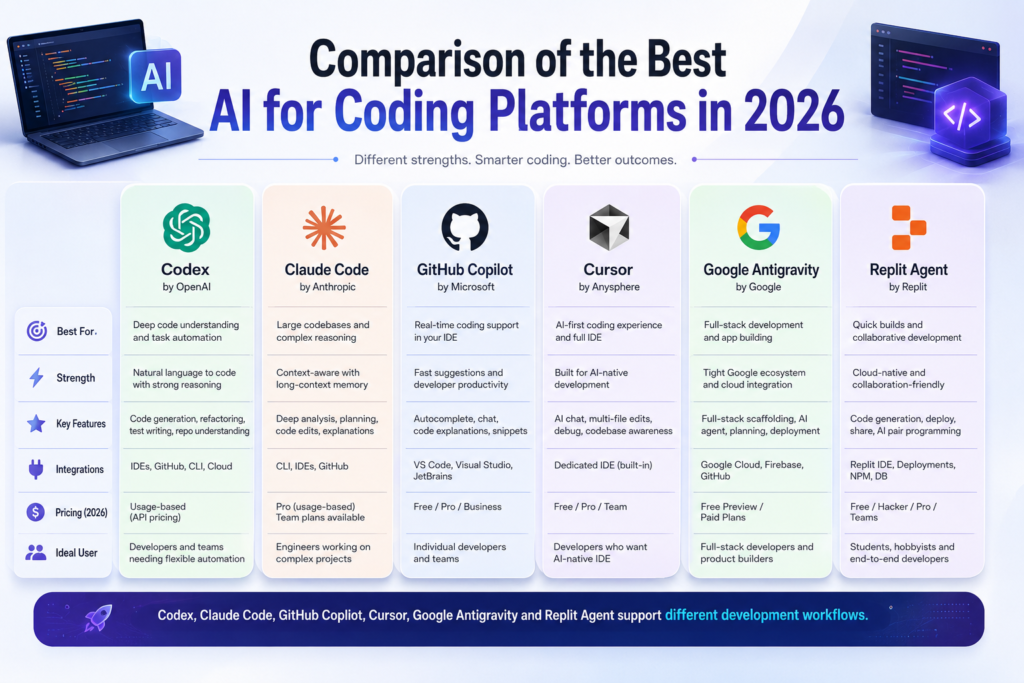
| Tool | Best for | Main environment | Standout capability | Main limitation |
|---|---|---|---|---|
| OpenAI Codex | Overall repository-level development | ChatGPT, desktop, IDE, terminal and cloud | Parallel agents and end-to-end engineering tasks | Requires careful permissions and review |
| Claude Code | Terminal-based reasoning and debugging | Terminal, desktop and supported IDEs | Detailed codebase exploration and planning | Long sessions require context management |
| GitHub Copilot | GitHub-centred teams | IDE, GitHub, CLI and cloud | Suggestions, agents, reviews and pull requests | Features vary by mode and plan |
| Cursor | AI-first software development | Desktop, CLI, web and mobile | Codebase-aware agents in one workspace | Requires adapting to a new environment |
| Google Antigravity | Google development workflows | Desktop and terminal | Agent orchestration and Google integrations | Product transition may confuse existing users |
| Replit Agent | Beginners and rapid prototypes | Browser, desktop and mobile | Prompt-to-application building and deployment | Less architectural control for complex systems |
Which Is the Best AI Model for Coding?
The best AI model for coding depends on the task and the product through which the model is used.
Notable coding-focused models available in 2026 include:
- OpenAI’s GPT-5.3-Codex
- Anthropic’s Claude Opus 4.8
- Google’s Gemini model family
- Models and agent systems integrated into Cursor
- Models available through GitHub Copilot
OpenAI describes GPT-5.3-Codex as a coding-focused model designed for broader agentic computer work.
Meanwhile, Anthropic positions Claude Opus 4.8 for complex agentic coding and enterprise tasks.
However, developers should not choose a tool solely from a benchmark leaderboard.
A model may generate an impressive standalone function but perform differently when it must:
- Navigate a large repository
- Follow project conventions
- Use development tools
- Recover from failed tests
- Respect permissions
- Prepare reviewable changes
Therefore, evaluate the complete system rather than only the model name.
Real-World AI Coding Use Cases
Building a new feature
A developer can ask an agent to inspect an existing authentication system and prepare a plan for adding social login.
The developer reviews the plan before the agent edits the project.
Repairing a failing application
Provide the agent with the full error, reproduction steps and expected outcome.
Then ask it to:
- Reproduce the failure.
- Identify the root cause.
- Create a failing test.
- Fix the problem.
- Run the relevant test suite.
- Explain the final changes.
Refactoring legacy code
An AI agent can locate duplicated logic, identify dependencies and prepare a staged refactor.
However, large refactors should be divided into smaller pull requests. This makes regressions easier to identify and changes easier to review.
Writing tests
A team can ask an assistant to examine untested functions and propose meaningful test cases.
The developer should review whether those tests reflect real requirements rather than only increasing coverage.
Learning a programming language
A beginner can use an AI assistant to:
- Explain a code sample
- Compare unfamiliar syntax
- Identify mistakes
- Suggest exercises
- Review solutions
- Demonstrate alternative approaches
The best learning results come from asking why the code works, not simply requesting a finished answer.
Creating an internal tool
A company may use an agent to build a dashboard, automate a report or connect two internal systems.
These projects are often good starting points because the requirements are narrow and employees can provide frequent feedback.
Reviewing pull requests
AI can provide an initial review for:
- Logic errors
- Missing tests
- Unclear code
- Inconsistent patterns
- Possible security concerns
However, it should support rather than replace review by someone who understands the product.
Best Practices for Using AI Coding Tools
Define a measurable outcome
Avoid vague requests such as:
Fix the checkout system.
Use a specific instruction:
Customers receive a 500 error when applying a percentage discount to an order containing two subscription products. Reproduce the problem, add a failing test, fix the root cause and run the checkout test suite.
The second prompt gives the agent a clear definition of success.
Ask the agent to inspect before editing
For major tasks, request an explanation and plan before allowing code changes.
This reduces the chance of solving the wrong problem.
Add project-specific instructions
Document:
- Coding conventions
- Directory structure
- Approved dependencies
- Testing commands
- Security requirements
- Naming standards
- Files the agent must not modify
A repository instruction file helps coding agents follow consistent rules.
Keep tasks focused
“Modernize the entire application” is too broad.
Instead:
- Upgrade one dependency.
- Resolve compatibility problems.
- Run the test suite.
- Update affected code.
- Prepare a focused pull request.
Smaller tasks are easier to validate.
Require evidence
Ask the assistant to:
- Run tests
- Run the build
- Execute static analysis
- Check formatting
- Show relevant output
- List changed files
- Identify unresolved risks
Evidence is more valuable than a statement that everything works.
Review the final diff
An agent’s summary may omit an accidental change.
Inspect every meaningful modification before merging it into a production branch.
Protect secrets
Exclude credentials, production keys, customer data and sensitive environment files from unnecessary AI access.
Use limited permissions and isolated development environments where possible.
Compare tools using your own project
Create a controlled test containing tasks such as:
- Fixing a known bug
- Adding a small feature
- Explaining an unfamiliar module
- Writing useful tests
- Refactoring duplicated code
Measure:
- Correctness
- Review time
- Number of human corrections
- Quality of tests
- Security of the result
- Ease of using the tool
This approach will reveal more than a generic online demonstration.
Future Trends in AI Coding
Coding assistants will become coding agents
The industry is moving from predicting individual lines toward completing engineering outcomes.
Instead of asking for a function, developers will increasingly assign a bug, issue or feature.
Developers will supervise multiple agents
One agent may implement a feature while another creates tests and a third reviews security risks.
OpenAI Codex, Cursor and Replit already support forms of parallel agent work.
Verification will become more important
Generating code is becoming easier. Proving that the code is correct, secure and maintainable remains difficult.
Future coding systems will place more emphasis on:
- Automated tests
- Independent evaluators
- Security scanning
- Visual validation
- Reproducible logs
- Policy-based approvals
- Traceable commits
Organizations will create agent instructions
Companies will give coding agents reusable rules covering architecture, style, security, testing and review.
Therefore, repository structure and documentation may become major competitive advantages.
Security controls will influence purchasing
As coding agents gain access to repositories, terminals and external services, businesses will demand:
- Sandboxing
- Network restrictions
- Protected credentials
- Approval gates
- Audit logs
- Data-retention controls
- Agent-specific policies
Developers will focus on higher-level decisions
AI will handle more routine implementation. Nevertheless, developers will remain responsible for:
- Defining the problem
- Choosing the architecture
- Understanding users
- Evaluating trade-offs
- Protecting data
- Reviewing output
- Maintaining reliability
- Accepting accountability
Programming will not disappear. Instead, the relationship between writing code and directing software systems will continue to change.
Frequently Asked Questions
What is the best AI for coding in 2026?
OpenAI Codex is our strongest overall recommendation for professional repository-level development. Claude Code is excellent for terminal-based workflows, while GitHub Copilot suits GitHub-centred teams. Cursor offers an AI-first workspace, Google Antigravity supports Google development workflows, and Replit Agent is approachable for beginners.
Which AI model is best for coding?
GPT-5.3-Codex, Claude Opus 4.8 and Google’s current Gemini models are notable options. However, the best model depends on the task, repository context, tools, permissions and development environment.
Is ChatGPT or Claude better for coding?
ChatGPT with Codex is a strong choice for broad agentic workflows across chat, desktop, editor, terminal and cloud environments. Claude Code is particularly strong for terminal-based exploration, planning and interactive development. Testing both with the same project task is the most useful comparison.
What is the best coding AI for beginners?
Replit Agent is one of the most approachable choices because it combines natural-language instructions, coding, previewing and deployment. Beginners who want to learn traditional development may also benefit from an IDE assistant that explains each change.
Is GitHub Copilot better than Cursor?
GitHub Copilot is usually the better fit for teams deeply connected to GitHub and traditional IDE workflows. Cursor may be better for developers seeking an AI-first coding workspace with codebase-aware agents.
Can AI coding tools replace programmers?
AI can automate parts of programming, but it cannot remove the need for architecture, security, product decisions, testing and accountability. Organizations still need people who understand and can maintain the software.
Is AI-generated code safe?
AI-generated code can be used safely after proper testing and review. However, it should never be assumed secure automatically. Developers should use restricted permissions, automated tests, dependency scanning, security analysis and human review.
Conclusion
The best AI for coding is the tool that fits your development environment and produces work your team can confidently verify.
OpenAI Codex provides the strongest all-round agentic experience for repository-level development. Claude Code is compelling for terminal-based problem solving, while GitHub Copilot fits naturally into GitHub workflows.
Cursor offers an AI-first development workspace. Google Antigravity is emerging as Google’s central platform for agentic development, while Replit Agent lowers the barrier for beginners, founders and rapid prototyping.
Do not judge these tools only by how quickly they produce code.
Instead, evaluate how well they understand your project, follow instructions, execute tests, protect sensitive information and present changes for review.
AI can make a capable developer significantly more productive. However, the greatest advantage comes from combining faster implementation with strong judgment, disciplined verification and clear human accountability.
Curated by the TechWave Digest Research Team